
As part of the acquisition of Stratodesk by IGEL, NoTouch OS - Stratodesk’s thin client operating system - was sunset, with a “direct path” provided by Stratodesk allowing existing NoTouch OS clients to migrate directly to IGEL OS 12.
What started out as a “Linux OS doing Linux things” issue quickly turned into a rabbit hole that kept getting weirder and weirder.
The early signs of trouble
As part of our testing and validation of IGEL OS 12, the migration image provided by the Stratodesk team (How to Migrate from Stratodesk to IGEL) of course had to be tested.
After a quick test in our lab, the VM running NoTouch OS had migrated and was running IGEL OS 12 within 10 minutes of starting the migration.
Perfect.
The VM booted, kept its hostname, imported its certificates and, most importantly, retained its configured static IP address.
Within 10 seconds of booting into IGEL OS 12, the VM was picked up by the UMS (the management platform used for managing clients running IGEL OS) and automatically onboarded (Registering Devices Automatically on the IGEL UMS) - all without lifting a finger.
Fast forward a couple of months, and more migration tests.
A colleague and I were testing a specific hardware model as part of our validation, starting with a fresh installation of IGEL OS 12.8.1 LTS.
We went through the onboarding wizard, configured the device’s static IP address, connected it to the UMS and restarted it, ready to begin testing.
Or so we thought.
The device immediately started throwing errors such as “unable to apply custom splash screen” - a feature that requires the device to be licensed.
Odd, considering we had already pre-registered the device based on its MAC address, referred to by IGEL as the “UnitID” for licensing purposes.
When running the UMS in a fully air-gapped environment, licensing needs to be done through IGEL’s licensing portal (Activation.igel.com) by providing the MAC addresses of your devices, generating a license file and uploading it to the UMS. Licensing is tied to the UnitID of the IGEL OS 12 device, which primarily consists of the device’s MAC address.
We tried refreshing the license information, followed by sending a remote reboot command.
Nothing happened.
Looking at the device, we quickly realised why: the device itself was offline.
After a quick reboot, hoping it would resolve itself, the device was indeed still offline and unable to connect to the network.
We went into the setup - the local IGEL OS 12 settings panel - only to discover, or rather be reminded, that this particular device had two network cards. Something IGEL OS 12, for some reason, did not seem to like during our test.
The static IP address we had previously configured and confirmed working during onboarding was suddenly no longer configured on the network card that was up, Ethernet Adapter 2, but rather on the other network card, Ethernet Adapter 1.
We switched the IP address back to the correct network card and, within seconds, everything started working again.
Everything except the licensing.
We went ahead and re-licensed what appeared to us at the time to be the “new” UnitID (something we’ll get back to later), now apparently matching the other network card, and got the device back up and running.
At the time, we mostly put it down to “Linux OS doing Linux things” with multiple network cards and moved on.
Discovering the bug
Fast forward to migration time.
The migration was fairly simple:
- 5 machines running NoTouch OS were to be migrated to IGEL OS
- All MAC addresses pulled from the NoTouch Admin Center
- All pre-registered and licensed in the UMS
The first machine had the migration image pushed, reinstalled itself and booted into IGEL OS - at the time of migration, IGEL OS 12.8.2 LTS.
The team on site confirmed the hostname and IP address had been migrated and auto-configured.
For some odd reason, the device wasn’t automatically onboarded. Our automatic registration setup used the DNS record igelrmserver.domain.local, pointing to our UMS server.
In our environment, an unmanaged IGEL OS 12 device would normally attempt automatic registration using the following process:
- Perform a DNS query for the record
igelrmserver.domain.local- If resolved, attempt to reach the resolved IP address over TCP 30001
- If reachable, automatically onboard to the UMS server
Instead, the team got the device onboarded by providing the UMS information during the wizard.
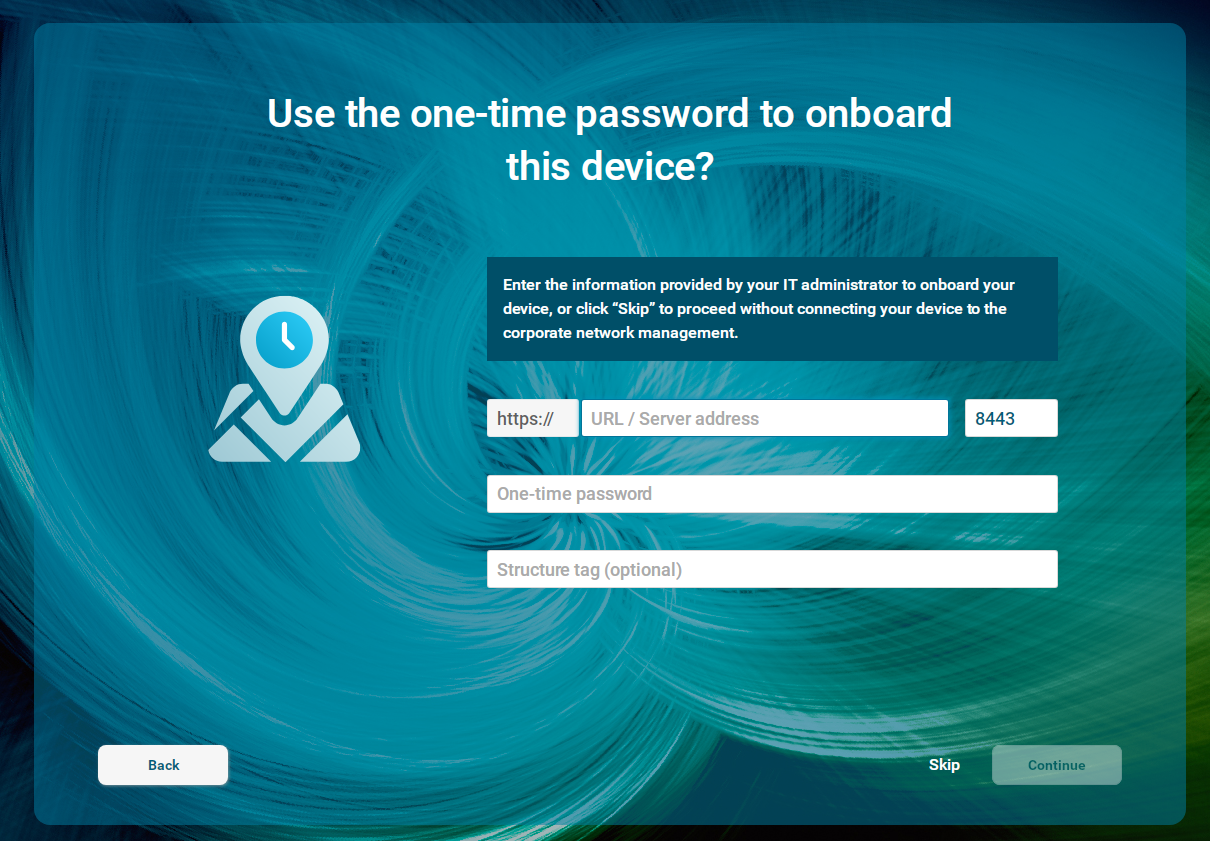
The device was onboarded, started pulling down the profiles and restarted.
And then it happened - the device went offline.
Completely forgetting our previous encounter during testing - and due to not knowing that these devices had more than one network card, as they were physically mounted inside the wall - the on-site team started troubleshooting.
After multiple reboots, the team restarted the device a final time in order to access recovery/emergency mode - a way of accessing the local setup when setup is disabled during normal operation, like in our configuration.
And there it was.
The static IP address, migrated from NoTouch and re-applied automatically during the migration, was not configured on the network card we knew from the information available in the NoTouch Admin Center.
It had - as you’ve probably guessed by now - been configured on the second network card.
Remember Ethernet Adapter 1 & 2?
We removed the IP address from the second network card, applied it to the first, rebooted the device, and it came back up as expected.
On to the next device.
Exact. Same. Scenario.
Again, fixed by reconfiguring the IP address on the “correct” network card.
Then on to the final three devices.
Every single device experienced the exact same behaviour.
We still had no idea what was actually causing it, but by this point a bug was clearly showing itself.
And given that all five devices had just been migrated, the migration image was the obvious suspect.
Chasing support
As we have a fairly good relationship with the guys at Stratodesk (now part of IGEL), we quickly brought this to their attention.
While waiting for support to get back with a resolution, I started debugging the migration image myself to figure out what was actually happening during the migration.
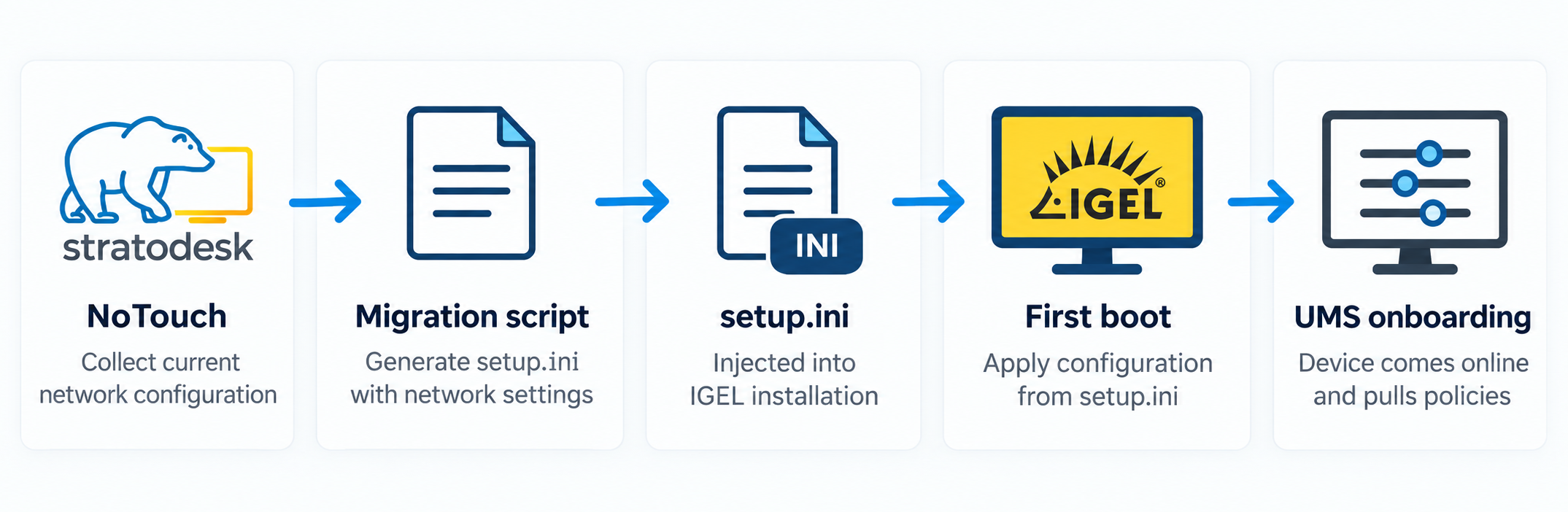
The migration process itself is fairly simple.
The currently used network configuration is collected from NoTouch, written into a setup.ini, and that configuration is then injected into the IGEL OS installation and used after the first boot.
Roughly:
NoTouch network configuration -> Migration exporter -> Generated setup.ini -> IGEL installation -> First boot
Or if you want a pretty picture:
Looking through the generated configuration, one thing immediately stood out - the migrated network configuration was tied to a logical device position:
<device0>
    ipaddr=<saved IP>
    netmask=<saved netmask>
</device0>

<default>
    gateway=<saved gateway>
</default>
There was no MAC address, interface name or other obvious hardware identity in that section telling IGEL OS which physical network card the configuration originally belonged to.
On a single-NIC device, that isn’t particularly interesting. There is only one place for the configuration to go.
With two network cards, however, device0 only works if the physical interface we expect also happens to be the interface IGEL OS considers device0.
From one of the affected systems, we could already see that wasn’t always the case:
enp2s0  -> cable connected -> device1
enp3s0  -> no carrier      -> device0
That lined up rather nicely with what we had seen in production.
The cable hadn’t moved. The static IP hadn’t disappeared. From what we could see, the configuration appeared to be landing on the wrong logical network device.
At this point, this was still only a hypothesis - but it was a pretty convincing one.
So naturally, we blamed the migration image.
I sent my findings from the custom-made .lfi migration image back to support, hoping we had found the culprit.
About a week later, a hotfix was provided.
The updated migration image handled dual-NIC systems differently, copying the migrated network configuration across the available Ethernet entries rather than assuming that the active NoTouch interface would always line up with the same logical device in IGEL OS.
At the time, that looked like a perfectly reasonable explanation for everything we had seen.
There was just one problem.
Trying to reproduce the issue was inconsistent.
Unfortunately, we couldn’t get the same hardware models for testing (industry custom-built systems are, to no surprise, expensive), so we tried the updated image on VMs and some other spare models - including the good old HP T430, although that particular model only has one network card.
Everything migrated successfully, kept its IP address and came back online after rebooting.
Which was useful.
And also increasingly annoying.
This looked familiar
Getting more and more frustrated, something finally clicked.
I had seen this before.
Remember the validation testing from earlier? That device also had two network cards. At the time, because we had no awareness of a larger issue, we thought nothing of it.
More importantly, there was another test I had mostly forgotten about.
While testing how restrictive we could be network-wise, I had created a VM running IGEL OS 12.9.0 and given it two network cards - one connected to our lab domain with limited access to the internet, the other disconnected.
I got interrupted during the testing and forgot about the VM. In the meantime, it had rebooted because new profiles required a restart in order to apply.
When I eventually jumped back into the test, the device was showing as offline in the UMS.
I opened the console and found the machine happily powered on, sitting at the IGEL desktop.
It was, however, offline.
Since the machine was using DHCP for internet access, I went into setup, reconfigured DHCP, let it pull down the missing profiles, pushed some new profiles from the UMS and rebooted it.
Offline it went again.
Weird.
I blew away the VM and recreated it.
Before continuing, I double-checked the setup and remembered one rather important difference between the lab and the environment where we originally saw the problem.
The lab had internet access.
That meant we could use automatic licensing, so if the device suddenly appeared with a different UnitID during onboarding, the licensing side of the problem would be considerably easier to miss.
That was enough to make me go back and try to reproduce the whole thing properly.
The breakthrough
I created a VM with two network cards, installed NoTouch OS, migrated it to IGEL OS, onboarded it and started checking what happened to the interfaces and device identity.
And there it was again.
The behaviour looked almost exactly like what we had seen on the physical machines.
At the time, the UnitID also appeared to line up with the “wrong” network card, which seemed to connect the strange licensing behaviour with the NIC issue.
That specific UnitID observation would need more investigation later, but at this point it gave us another reason to keep digging.

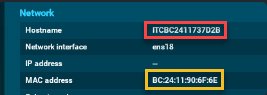
More importantly, I now wanted the migration image completely out of the equation.
So I created two new VMs, this time installing IGEL OS directly:
- one running IGEL OS 12.10.0 - the latest main release
- one running IGEL OS 12.8.2 LTS - matching the IGEL OS version we faced issues with in production
Both had two network cards, with one of them disconnected to simulate what we had seen on the physical devices.
And, more importantly:
No NoTouch.
No migration image.
No migrated setup.ini.
I onboarded the VMs, rebooted them and started watching the network configuration.
Both showed the same dual-NIC behaviour.
This was no longer a one-off - and no longer something we could blame on weird hardware behaviour.
Example of VM configuration, green is the network card with a working connection, red is the “disconnected” network card
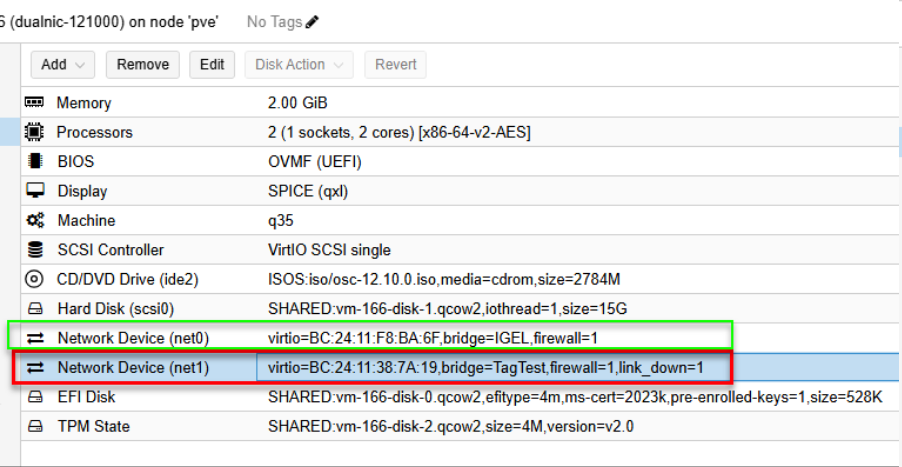
Once onboarded, the disconnected network card was used as Ethernet Adapter 1, with the IP configured
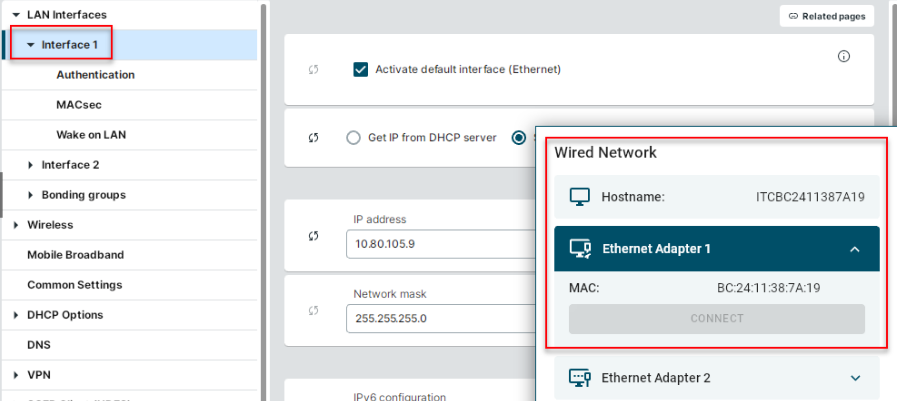
And, more importantly, it was no longer something we could explain purely through the NoTouch migration image.
We now had something we could reproduce across both the LTS branch and the main release branch without involving Stratodesk’s migration image at all.
Dumbfounded, and still refusing to believe that it could be something as stupid as “the OS is unable to handle multiple network cards during onboarding”, I opened a new ticket.
This time with the IGEL support team.
We provided our findings, logs and screenshots and started the investigation all over again.
Support starts narrowing it down
The first reply from IGEL support was interesting, mostly because the logs didn’t quite agree with what the UI had been telling us.
The device might have been reporting “no cable plugged in”, but the kernel was clearly detecting a physical link.
After going through the logs, support pointed out:
“The kernel detects the link on enp1s0, but that interface does not obtain an IP address.”
So the cable itself wasn’t disappearing.
At this point, support was still considering several possibilities. The network configuration being assigned to the other logical interface was one of them, but so were differences in VLAN or DHCP configuration between the two physical switch ports - something that didn’t fit our setup particularly well, since only one of the two NICs was actually in use.
They asked us to reproduce the issue again and collect two support archives: one immediately before rebooting, while the static IP was still configured on the working NIC, and another immediately after the restart - before moving the cable or changing any network settings.
The idea was fairly simple: capture what happened to the interface mapping across the reboot instead of only looking at the system after we had restored connectivity.
After some more testing and another round of logs, the mapping became rather interesting.
On one of the affected devices, support found:
enp2s0 -> REDACTED:11:59:b2
enp3s0 -> REDACTED:11:59:b3
while IGEL OS had internally mapped them as:
device0 / eth0 -> enp3s0
device1 / eth1 -> enp2s0
After manually restoring connectivity, the static IP was shown as configured on device1/enp2s0.
The archive had been collected after we restored connectivity, so it still didn’t directly capture the IP address moving between interfaces. Support were careful about that as well:
“The logical-to-physical interface mapping is relevant and may explain why the saved configuration is applied to a different NIC after onboarding or a restart.”
Which sounded rather familiar.
There was another useful detail in the same logs.
The stored UnitID ended in 1159B2.
The MAC address for enp2s0 ended in 11:59:b2.
In other words, on this device the stored UnitID corresponded to enp2s0.
That meant our earlier assumption that the licensing behaviour itself proved the UnitID had been generated from the “wrong” NIC wasn’t actually supported by these logs.
Another theory moved slightly further down the list.
By this point, we had reproduced the problem on five devices across three different hardware models, which was already making a hardware-specific NIC or driver issue less convincing.
Then we provided the VM reproduction.
That was apparently enough to remove quite a few remaining variables.
IGEL support came back with:
“The VM reproduction is particularly helpful because it indicates that the behavior is not specific to a particular manufacturer or physical NIC driver.”
And, more importantly:
“This supports the suspected issue with how IGEL OS selects and maps network interfaces during Unit ID generation and onboarding.”
We now had enough evidence for the case to be escalated to IGEL’s 3rd-level support team.
While they started digging into that, I had another question.
How far back does this go?
While waiting for IGEL support to work on the issue, I asked a former Stratodesk engineer how NoTouch handled multiple network cards and got this response:

That explained another part of the puzzle: why the NoTouch Admin Center had only ever shown what appeared to be a single network card.
Curious to see whether this was a “new” bug, I kept spinning up VMs and testing different IGEL OS 12 releases.
The test matrix eventually covered versions across:
- 12.6.x
- 12.7.x
- 12.8.x LTS
- 12.9.x
- 12.10.0
- preview releases
Every IGEL OS 12 version I tested showed the same behaviour, and despite being able to reproduce it across multiple release branches, I couldn’t find any acknowledgement of it in the release notes under Known Issues.
At this point, the migration image was no longer the root-cause candidate it had been a week earlier. We could reproduce the underlying problem on a freshly installed IGEL system with no NoTouch configuration involved at all.
The rabbit hole had moved.
Again.
The found Uplink
A couple of weeks passed, and a wonderful message popped up on Teams:

I immediately spun up two VMs matching our previous setup: one running the IGEL OS 12.10.0 main release, the other running the provided hotfix.
Before testing, I had a quick look at the included Readme.txt inside the hotfix, wondering if there were any other interesting fixes.
And there it was:
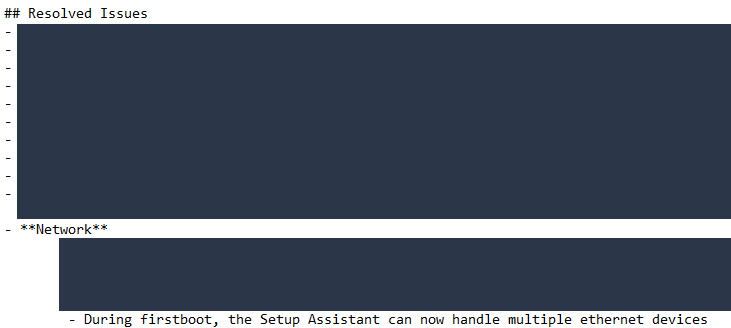
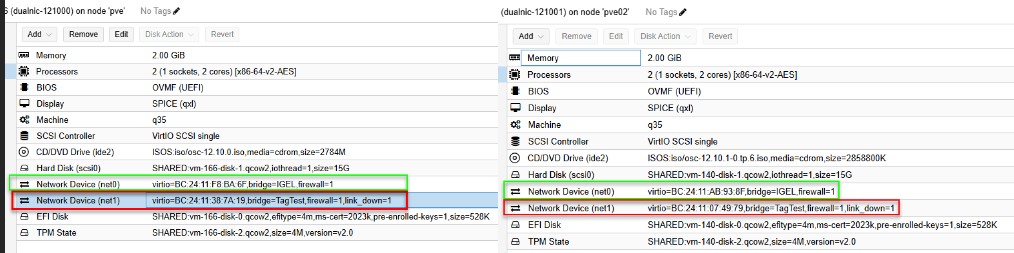
I prepared both VMs.
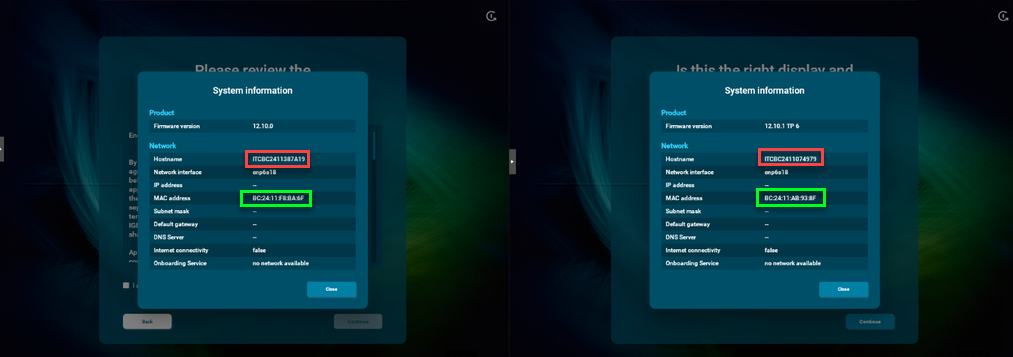
On the left, the main branch with the connected network card marked in green. On the right, the hotfix with the connected network card also marked in green.
By this point, I knew the UnitID was being generated from one of the network cards, and in these tests it kept appearing to use the disconnected one.
I wanted to figure out when it was created.
Lucky for me, that was rather easy to determine: the UnitID was already present during the installation phase of the OS.
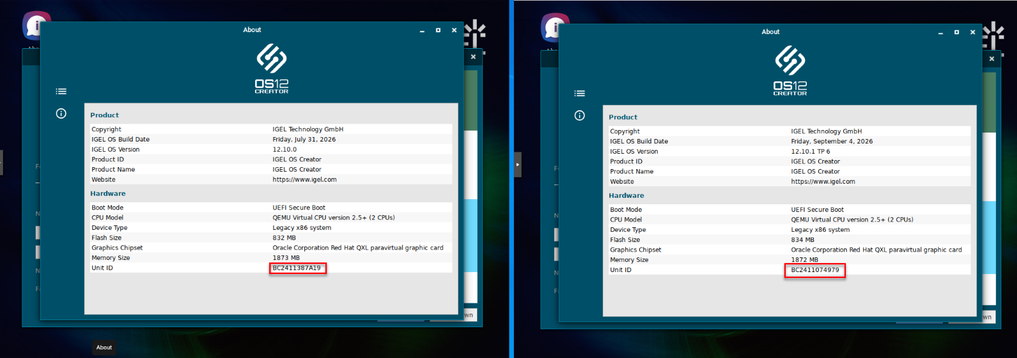
Again, in this test the UnitID was created from the disconnected network card, so unfortunately no change there.
During onboarding, both devices correctly detected the connected network card as the “one to use”, which had always been the case.
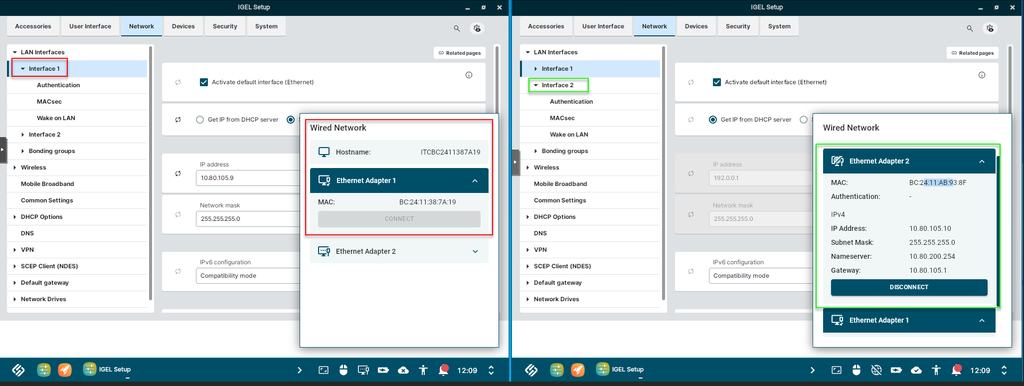
After onboarding both devices and rebooting, the device running IGEL OS 12.10.0 went offline as expected - the device on the left - with the static IP applied to Ethernet 1.
The device running the hotfix, however, was online after the restart, having successfully retained the static IP address on Ethernet 2.
Conclusion
What started out looking like a migration issue turned out to be an IGEL OS issue that could be reproduced without NoTouch or the migration image being involved at all.
On the affected IGEL OS 12 versions we tested, when more than one Ethernet adapter was present during onboarding, the selected static IP configuration could end up associated with the wrong logical Ethernet adapter after reboot.
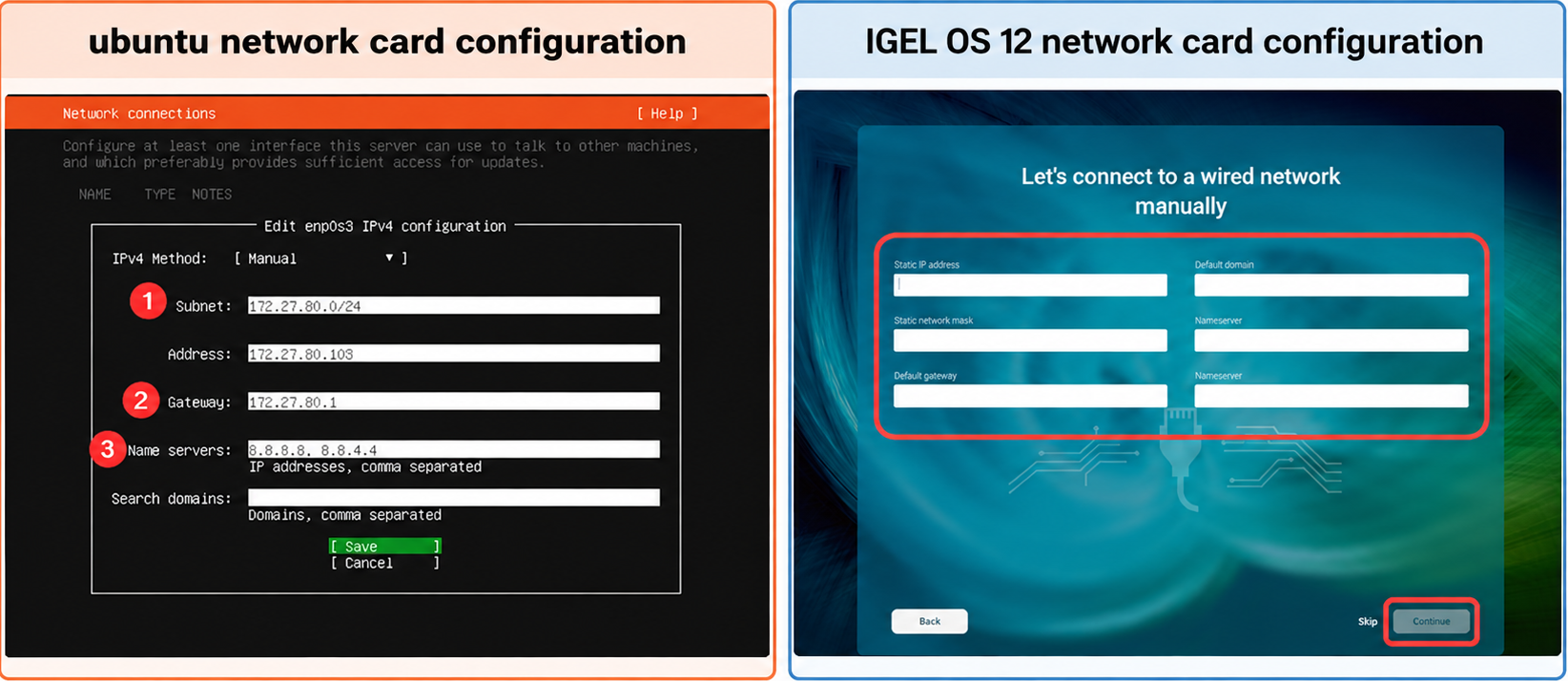
Unlike a traditional Linux installation where network configuration can be tied explicitly to a particular interface, the onboarding flow we were testing did not expose an equivalent way to pin that static configuration to the intended physical NIC.
The hotfix changed that behaviour in our test: with the same dual-NIC VM configuration, the normal IGEL OS 12.10.0 installation came back with the IP on Ethernet 1 and went offline, while the hotfix IGEL OS installation retained the IP on the connected Ethernet 2 interface and remained online.
What looked like a missing uplink wasn’t really missing at all.
IGEL just had a different opinion about which one I was looking for!
Now I just need to chase the UnitID… some other time ;)
–Added after publication - Fix released in OS 12.8.4
As of the 29th of september 2026, this issue has now been resolved with the release of IGEL OS 12.8.4

Glad to see our struggles were heard and a fix was shipped, thanks IGEL !