This started out looking like a simple UI parity problem.
In the IGEL UMS Console, device discovery supports TCP scanning on both the local network and an IP range. That lets administrators discover and onboard IGEL OS devices over TCP on port 30005, rather than using the default UDP scan, running on port 30005.
In some environments, the fewer ports open, the better. In others, TCP is a must if it’s available.
In the UMS Web App, things look slightly different:
| Interface | Scan type | TCP option |
|---|---|---|
| Classic UMS Console | Local network | Available |
| Classic UMS Console | IP range | Available |
| UMS Web App | Local network | Available |
| UMS Web App | IP range | Not exposed |
I assumed TCP scanning over an IP range simply hadn’t made it into the Web App yet. Some features were still being ported from the UMS Console, and the missing option made that seem reasonable.
Turns out, that assumption was wrong.
I’d seen the same behavior on earlier versions - After updating to the latest UMS release available at the time (12.14.100) and finding the issue was still there, I decided to take a closer look.
The missing checkbox
According to the IGEL documentation for the Scan and Register function in the UMS Web App, TCP scanning should already be available there.
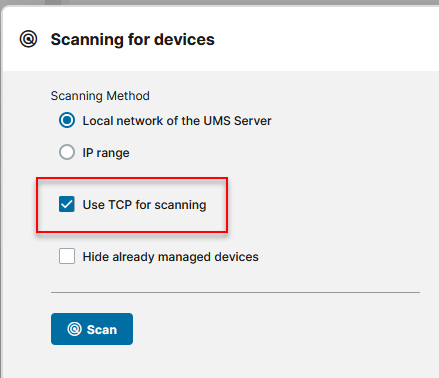
When I selected Local network of the UMS Server, the option was clearly there.
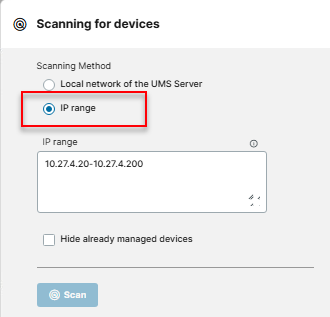
But when I switched to IP Range, it was gone.
Looking behind the scenes
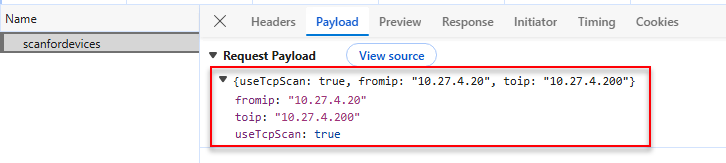
When I ran a scan, the UMS Web App sent a device-discovery request to:
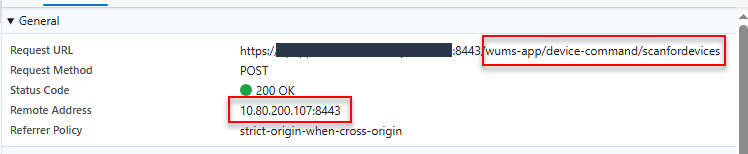
POST /wums-app/device-command/scanfordevicesFor an IP-range scan, the request looked like this:
{
  "fromip": "10.27.4.20",
  "toip": "10.27.4.200",
  "useTcpScan": true
}
Well, that was unexpected.
There was no TCP checkbox in the UI for IP-range mode, but the frontend was still sending:
"useTcpScan": trueThe compiled Web App JavaScript explained why: for an IP-range scan, the request builder hard-coded:
useTcpScan: trueSo the missing checkbox didn’t mean IP-range scanning was supposed to use UDP. Quite the opposite. The frontend was asking for TCP.
Or at least, it thought it was.
The firewall disagreed
The IP of the UMS server in question was:
10.80.200.107With the target range being:
10.27.4.20 - 10.27.4.200Despite the browser sending useTcpScan: true, the firewall showed:
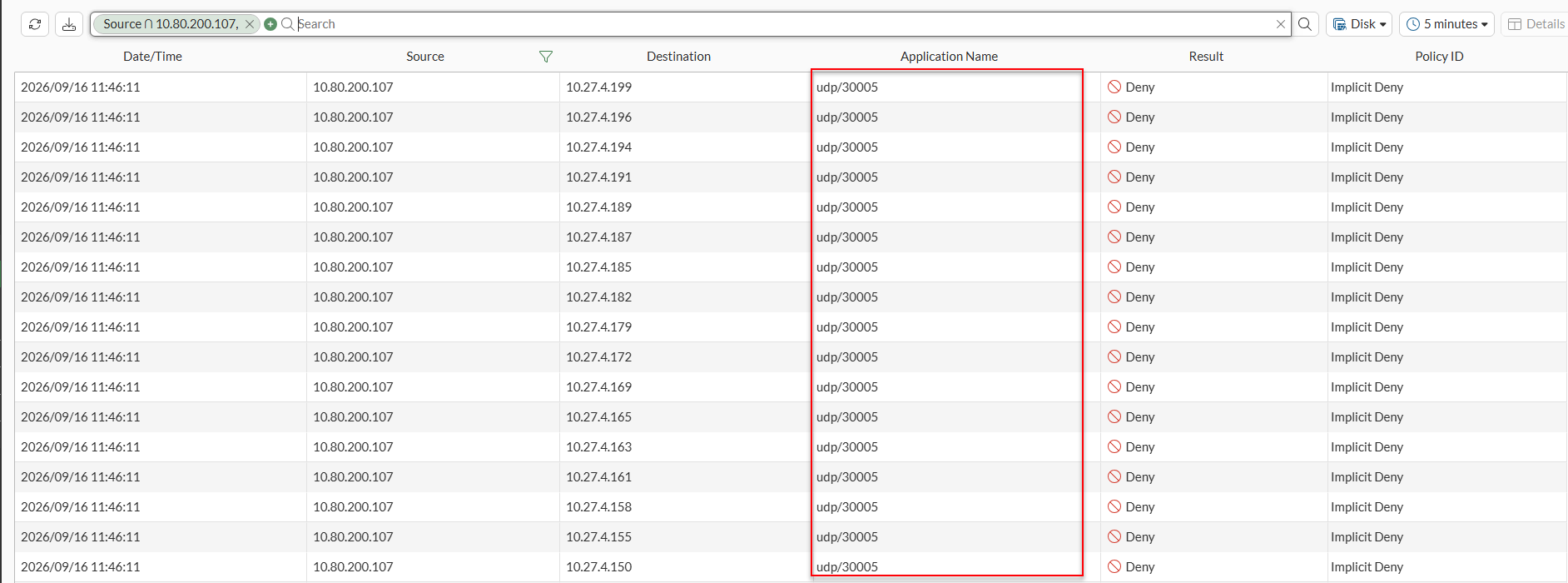
UDP/30005For example:
10.80.200.107 -> 10.27.4.253 UDP/30005
10.80.200.107 -> 10.27.4.250 UDP/30005
10.80.200.107 -> 10.27.4.247 UDP/30005
10.80.200.107 -> 10.27.4.244 UDP/30005
This wasn’t just cosmetic. The request appeared to ask for TCP, but the network showed UDP.
I also tried sending the value as a string instead of a JSON Boolean:
"useTcpScan": "true"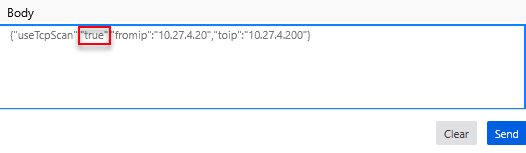
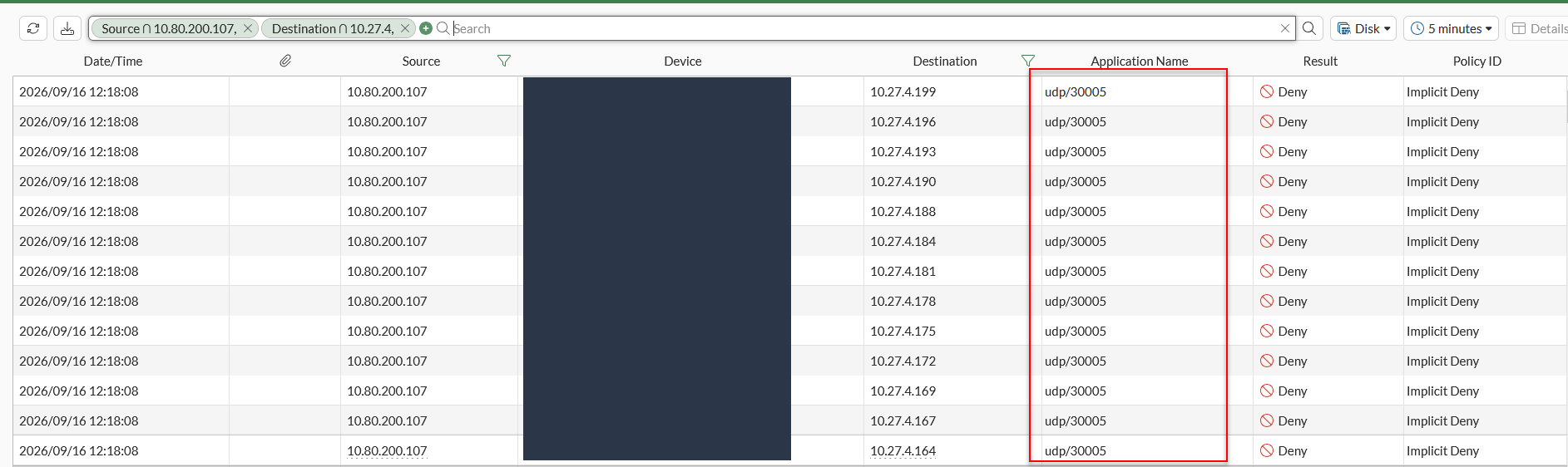
Still UDP.
I started to wonder whether the Web App and the classic Console were sending different parameter names.
That turned out to be the key.
Following the request through the Web App
Tracing scanfordevices through the Web App showed that the endpoint accepts the browser payload as a generic parameter map.
For example:
@PostMapping(value={"/scanfordevices"})
ResponseEntity<List<ScanDeviceResult>> scanForDevices(
    @RequestBody Map<String, String> cmdParams
) {
    return ResponseEntity.ok(
        this.deviceCommandDispatcher.scanForDevices(cmdParams)
    );
}
The Web App then passes the same map through its service chain until it reaches:
apitccmds/tccommands/scanfordevicesThe key point wasn’t each individual step. I couldn’t find any code that translated useTcpScan before the request reached the existing scan endpoint.
The request travels roughly like this:
Browser
 |
 | JSON parameter map
 v
/wums-app/device-command/scanfordevices
 |
 | forwarded unchanged
 v
Web App service chain
 |
 v
apitccmds/tccommands/scanfordevices
That left one obvious question:
What does the working classic Console send?
Looking at the classic Console
The classic Console already supports Use TCP for scanning during an IP-range scan, so obviously I wanted to see exactly what it sent.
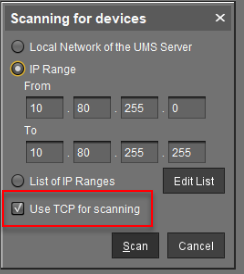
The key detail was how it built the scan parameters:
cmdParams.put(
    "usetcpscan",
    String.valueOf(tcpScan)
);
The command constants confirmed the same parameter name:
public static final String PARAM_USETCPSCAN = "usetcpscan";There it was.
The Web App sends:
useTcpScanThe classic Console sends:
usetcpscanVisually, the difference is almost ridiculous:
Classic Console
---------------
usetcpscan=true
 |
 v
TCP scan works

Web App
---------------
useTcpScan=true
 |
 v
Parameter ignored
 |
 v
UDP scan
I still wanted to rule out one detail: the classic Console sends the value as a string, while the Web App sends a JSON Boolean. So I tested both.
A typo. Or a type?
Here’s the test matrix:
| Test | Payload | Result |
|---|---|---|
| Original Web App | "useTcpScan": true |
UDP |
| Same key, string value | "useTcpScan": "true" |
UDP |
| Correct key, Boolean value | "usetcpscan": true |
TCP |
| Correct key, string value | "usetcpscan": "true" |
TCP |
Changing the value to a string still produced UDP:
With the corrected key, the result changed to TCP:
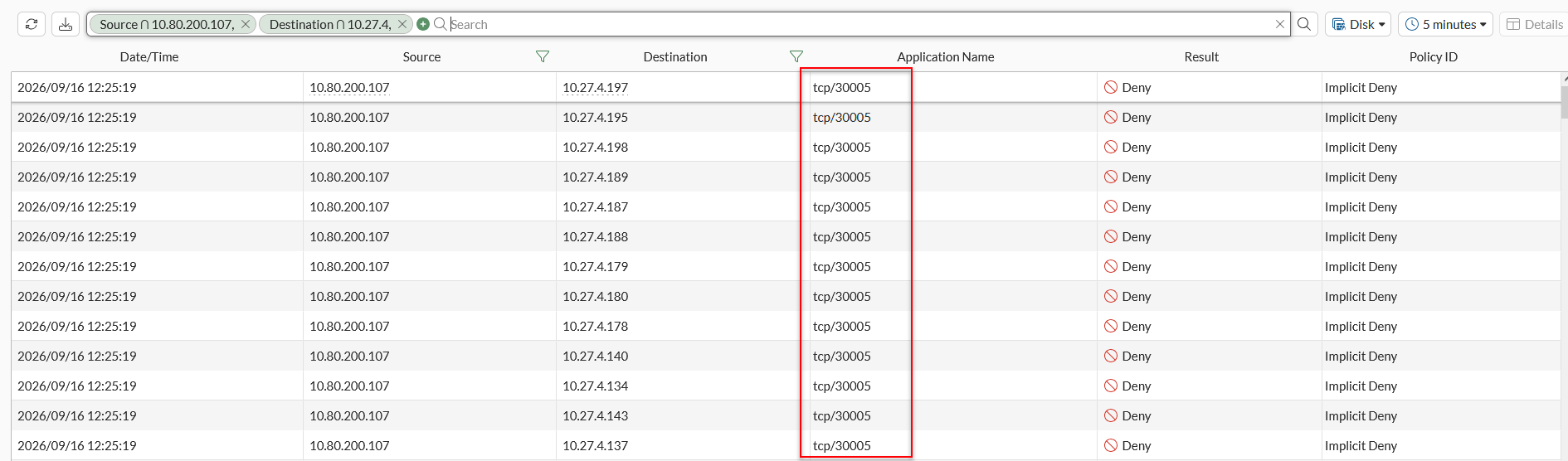
Using a JSON Boolean with the corrected key also produced TCP:
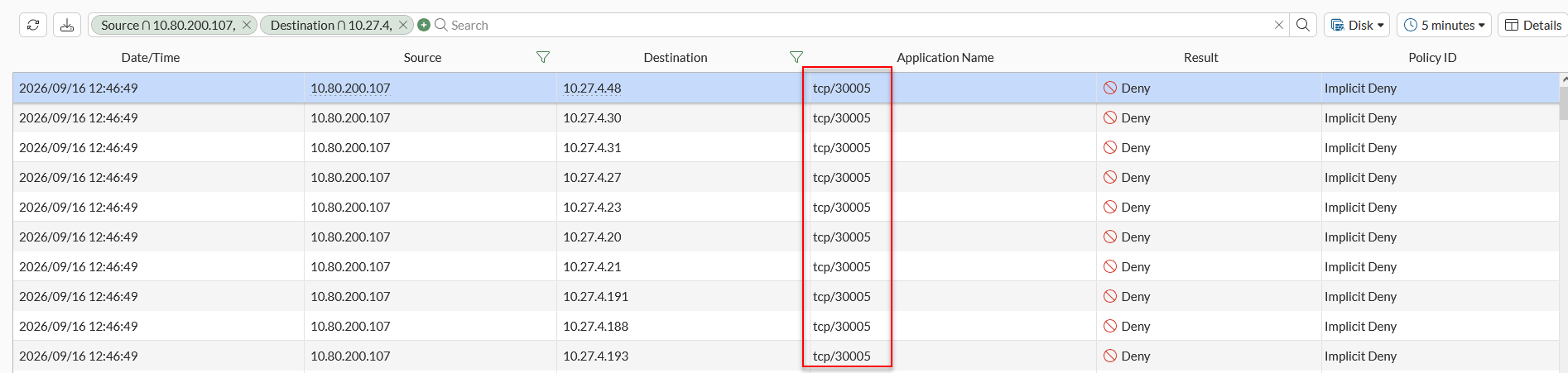
That ruled out the value type. The bug was the parameter name:
- useTcpScan
+ usetcpscan
That was it.
The existing TCP checkbox was broken too
I still hadn’t tested the existing Use TCP for scanning option. It scans the UMS Server’s local subnet, so I took a quick look at that request too.
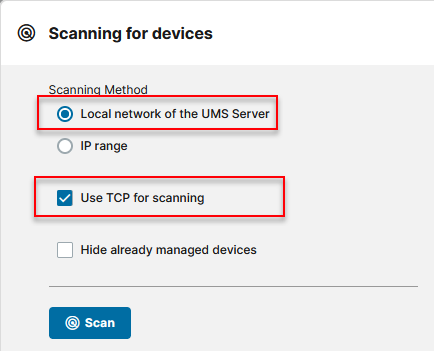
It used the same parameter:
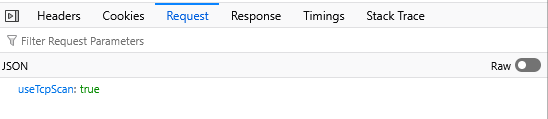
{
  "useTcpScan": true
}
The firewall still showed UDP/30005:

So the problem wasn’t limited to the hidden IP-range option. The visible Use TCP for scanning checkbox for a local-network scan sent the same incorrectly named parameter.
I couldn’t repeat the corrected-key replay for this request. Attempts to edit and resend it resulted in either HTTP 403 or NS_ERROR_NET_RESET.
That didn’t change the IP-range result, but it meant I couldn’t independently confirm the corrected local-network request using the same browser replay method.
So what actually broke?
The Web App frontend sends:
{
    useTcpScan: true,
    fromip: "...",
    toip: "..."
}
The existing UMS scan path expects:
{
    usetcpscan: true,
    fromip: "...",
    toip: "..."
}
The Web App forwards the parameter without translating its name, so the scan path doesn’t recognize the TCP flag. The scan therefore uses UDP instead.
Web App
    |
    | useTcpScan: true
    v
Web App backend
    |
    | forwarded unchanged
    v
UMS scan path
    |
    | expects usetcpscan
    v
TCP flag ignored
    |
    v
UDP/30005
With the corrected key, the scan path recognizes the parameter:
Web App
    |
    | usetcpscan: true
    v
UMS scan path
    |
    | parameter recognised
    v
TCP/30005
The capability wasn’t missing. The Web App was just asking for it under the wrong name.
Now how do we fix it?
Finding the typo was one thing. I also wanted to see whether correcting it was enough, or whether something else in the Web App would get in the way.
Since this was a lab UMS, I made a temporary change to the active frontend bundle.
The interesting part was that I didn’t need to build a new TCP option.
It was already there.
The scan dialog already had the Use TCP for scanning checkbox, along with its form control, translation string and state handling. The Web App simply hid the checkbox whenever IP Range was selected.
In the compiled template, that behavior boiled down to:
D(t.showIpRange()?12:-1),a(),D(t.showIpRange()?-1:13)Slot 12 is the IP-range field.
Slot 13 is the existing TCP checkbox.
For the lab test, I changed it to:
D(t.showIpRange()?12:-1),a(),D(13)After a hard refresh, there it was:
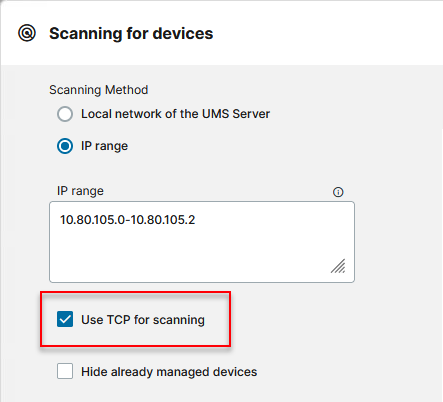
The request builder still needed the parameter name fixed. It contained:
e=Be({useTcpScan:!0},this.getIpRangeValues())For the test, I changed it to:
e=Be({usetcpscan:this.dialogForm.controls.useTcpScan.value},this.getIpRangeValues())The Web App now followed the checkbox.
Unchecked:
{
  "usetcpscan": false,
  "fromip": "10.80.105.0",
  "toip": "10.80.105.2"
}
produced UDP/30005:

Checked:
{
  "usetcpscan": true,
  "fromip": "10.80.105.0",
  "toip": "10.80.105.2"
}
produced TCP SYNs:
10.80.200.107 -> 10.80.105.0:30005  SYN
10.80.200.107 -> 10.80.105.1:30005  SYN
10.80.200.107 -> 10.80.105.2:30005  SYN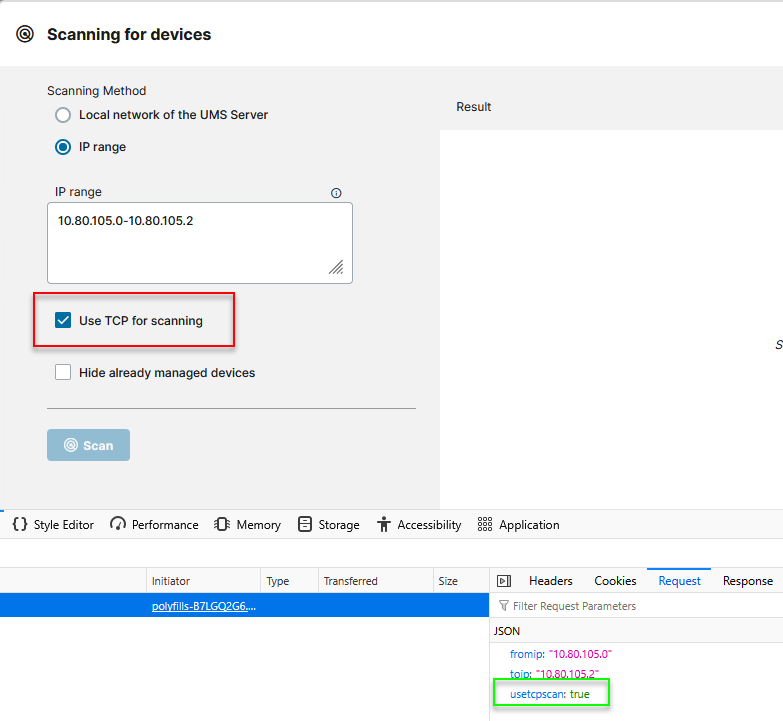

That closed the loop.
The checkbox already existed.
The TCP scan implementation already existed.
The IP-range scan implementation already existed.
For the IP-range path, the lab proof of concept only needed the existing checkbox exposed and:
- useTcpScan
+ usetcpscan
I wouldn’t run a modified UMS frontend like this as a production fix. The file is part of the installed Web App, so an update or redeployment could replace it, and it isn’t an IGEL-supported modification.
As a proof of concept, though, it showed there was no missing TCP feature left to implement.
The pieces were already there. They just weren’t connected correctly.
IGEL’s response
After I shared my findings, reproduction steps and lab proof of concept with IGEL Support, they reviewed the material and reproduced the issue. Support confirmed that the behavior was caused by a bug and escalated the case to the Development Team:
“Thank you for providing the video and all the additional files and information. They were very helpful in reviewing and reproducing the issue.
As you have already proved the behavior you are experiencing is caused by a bug. The case will therefore be escalated to our Development Team.”
In my lab, the fix only required exposing the existing checkbox for IP Range and using the parameter name the scan endpoint expects.
Since the TCP scan support is already there, this looks like a relatively small fix to a feature that’s currently broken in the Web App. IGEL haven’t confirmed a fix or target version yet, but I suspect it’ll be included in an upcoming release :)
Conclusion
The surprising part wasn’t that TCP scanning was broken.
It was that it had never really been missing.
The UI control existed.
The backend support existed.
The scan implementation existed.
A single parameter-name mismatch:
- useTcpScan
+ usetcpscan
was enough for the scan to ignore the TCP flag and use UDP instead.
Once the request used the expected key, the existing implementation worked over TCP/30005 without any backend changes.